Giving a slab a shape
A slab is placed flat and given its shape on its card. Shape lists only the shapes the slab's outline can take, and Flat turns it back into a flat slab.
| Shape | The slab it stands on | Set on the card |
|---|---|---|
| Vault | Four sides, opposite sides parallel | Axis, Rise |
| Folded plate | Four sides, opposite sides parallel | Axis, Rise, Faces (2 to 8) |
| Dome | A slab placed with the Circular method; a slice under 360° gives a part dome | Rise, Top opening diameter |
| Pendentives | A slab placed with the Regular polygon method, or a square | Nothing: every size comes from the polygon |
| Sail vault | A slab placed with the Regular polygon method, or a square | Nothing: every size comes from the polygon |
The slab methods are on Modelling Walls and Slabs. A ring slice, a circle slab with an Inner radius, takes no shape, and a shaped slab takes no opening.
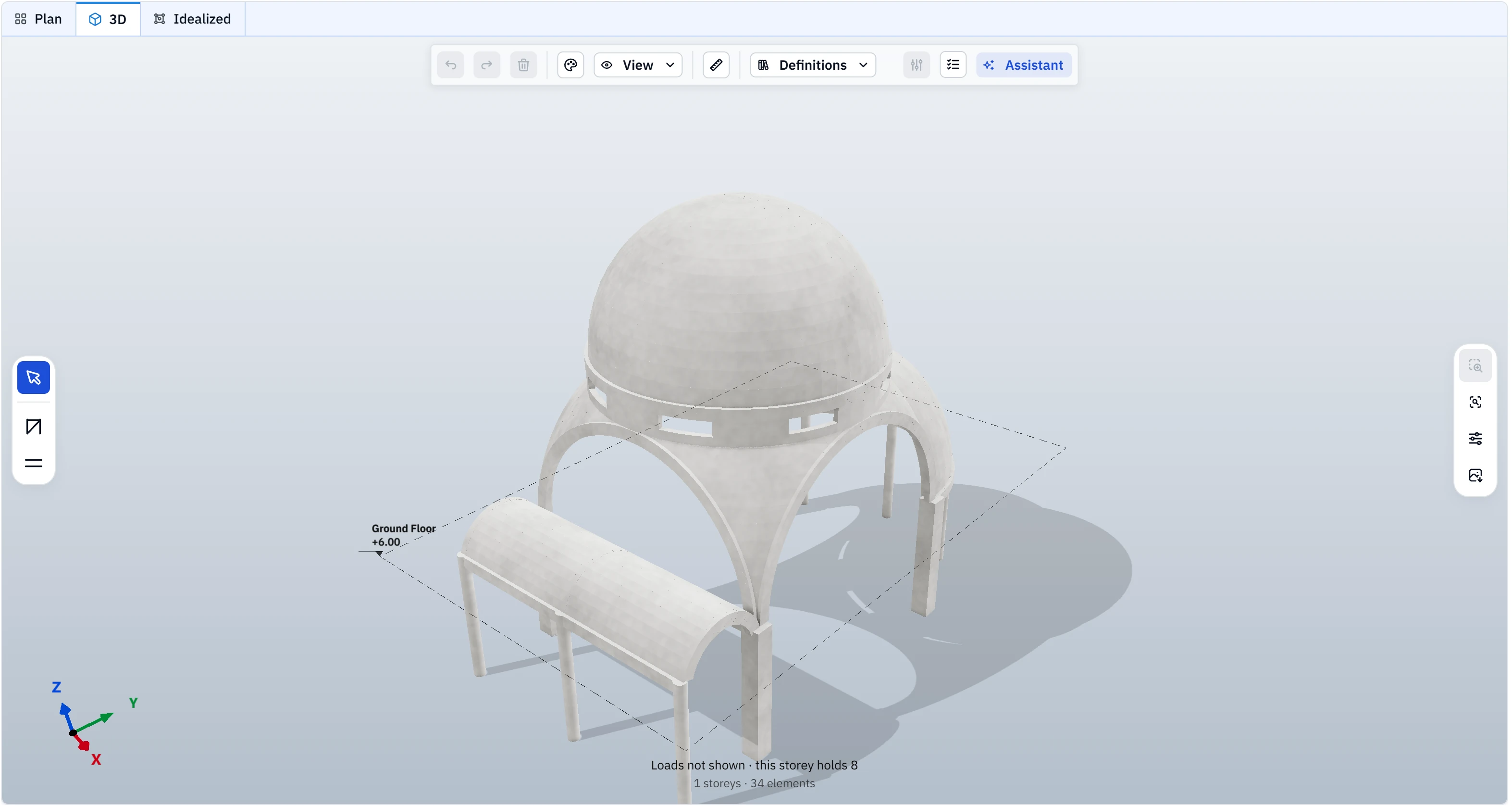
Vault and folded plate
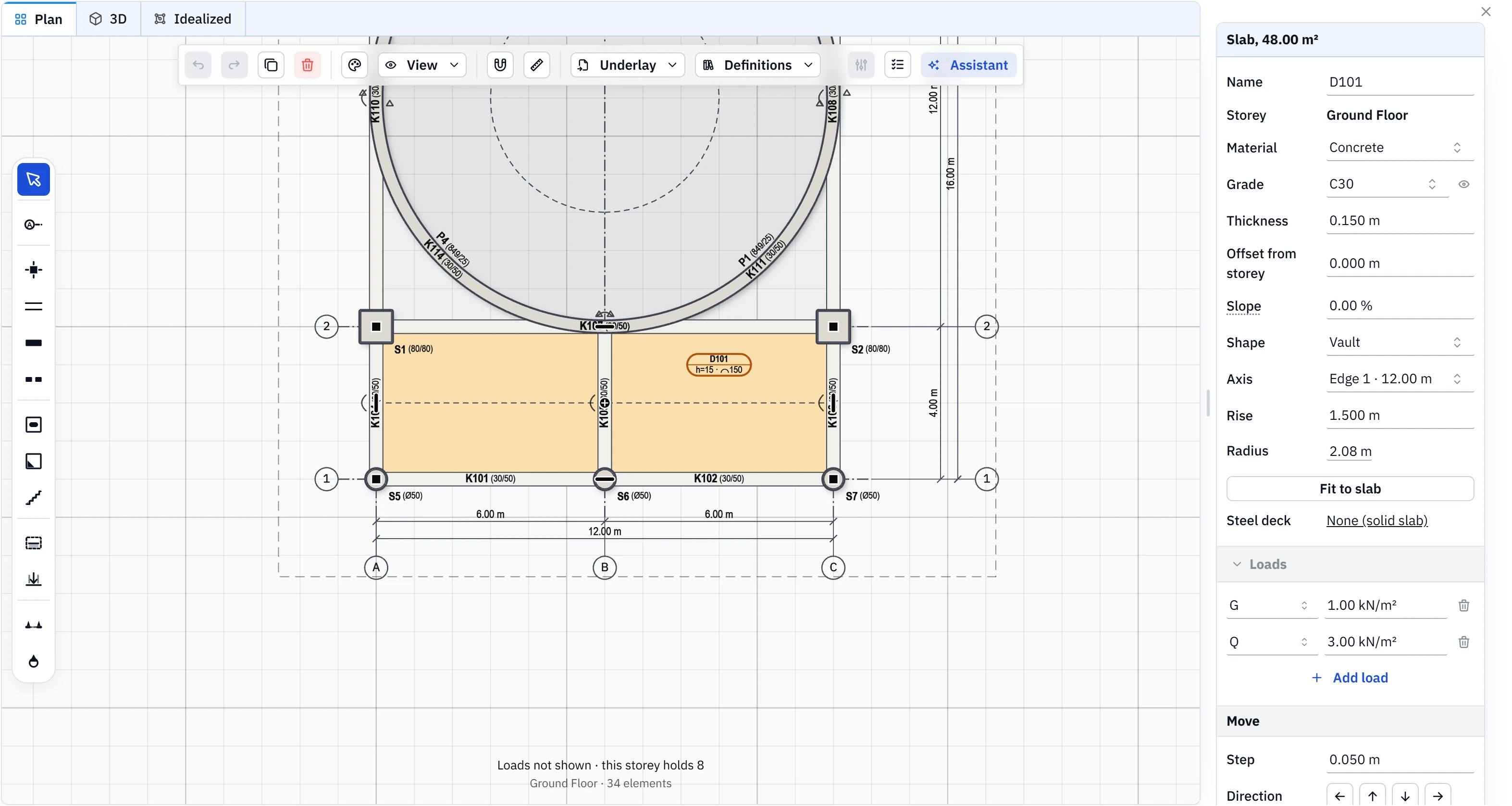
A vault's section is a circular arc between the two edges along its Axis. Axis names one of the slab's two edge directions, Edge 1 or Edge 2 with its length, and starts on the longer one. Rise is the height of the arc's crown above the edges. A shape chosen on a flat slab starts at a rise of 1 m, and the highest rise is a half circle across the slab: a larger value is cut to it. Radius gives the arc's radius and cannot be typed.
A folded plate has the same arc with Faces flat faces drawn inside it, two at first (a pitched roof) and up to eight. Its Rise is the height of its highest fold.
Fit to slab puts on the slab's top the ends of the beams it meets, the tops of the columns under it and the tops of the shear walls under it. A beam across a vault, square to its axis, becomes an arch with the vault's rise. The fit is done when the button is pressed: after a change of shape or rise it is pressed again.
Dome
A dome stands only on a circle slab. A slab placed with the Circular method keeps its circle, and its card gives Radius, Start angle and Sweep (1° to 360°): a sweep of 180° is a half dome, 270° a dome open on one side. Dragging a corner of the slab by hand drops its circle, and the dome with it.
Rise is the height of the dome's crown above its base, up to a hemisphere, whose rise is the base radius. Sphere radius gives the radius of the sphere the dome is part of. Top opening diameter opens the dome at its crown, and 0 closes it.
The beams that go with a dome are laid from the card, under Dome beams.
| Button | What it lays |
|---|---|
| Add base ring | A ring beam on the dome's base |
| Add edge arches | Arches on the open edges of a part dome |
| Add crown ring | A ring beam round the top opening; shown when the dome has one |
| Add ribs | Ribs arches from the base to the crown, 1 to 64 |
These are ordinary beams: each can be selected, given a section and deleted on its own.
Pendentives and sail vault
Pendentives and a sail vault are cut from one sphere through the corners of a regular polygon, and they take no rise: every size comes from the polygon. Pendentives leave the middle open, the polygon's inscribed circle, and rise to half a side at the crown of each side. A sail vault covers the whole polygon.
| Button | What it does |
|---|---|
| Add arches | A half-circle arch on each side, corner to corner |
| Add ties | A tie on each side at the corners' height, taking tension only; a Ø40 round bar at first |
| Drum height | The height of the drum under a dome laid on the pendentives; pendentives only |
| Drum windows | The number of windows round the drum, 0 to 64; shown when there is a drum |
| Add dome on top | A hemispherical dome on the inscribed circle, as its own circle slab; with a drum, on curved shear walls round that circle; pendentives only |
The dome laid on top has the pendentives' thickness and is a slab of its own: its card is a dome's card, with its Dome beams.
On the plan and in 3D
The plan draws a shaped slab's form with thin dashed lines: a vault's crown, a folded plate's folds, a
dome's ring at half its radius and a sail vault's inscribed circle. A dome's top opening and the open
middle of pendentives are drawn as solid lines. The slab's tag gives the rise after its thickness:
h=15 · ⌒150 is a 15 cm slab rising 150 cm. The 3D tab draws the slab by its flat faces.
In the analysis
A shaped slab is analysed as its flat faces, each a shell of the slab's thickness. A vault is cut into strips that stay within 10 mm of its circle, and a folded plate into its own faces. An arch over the slab is cut where the faces' corners are, so the arch and the slab share their nodes. A shaped slab is in no horizontal diaphragm.
The model check reports a shaped slab that the beams along it do not hold at its height as Slab off its supports: Fit to slab puts the beams on it. Two slabs sharing an edge that opens by more than 5 mm, one of them shaped or sloped, are reported as Open ridge or valley. A storey with a shaped slab cannot be sent to the footfall analysis.
With the assistant
The assistant lays a vault, a folded plate, a dome, pendentives or a sail vault with the slab it places, on the outline the shape needs. A dome asks for a circle slab, which the assistant places with its centre and radius. A rise not given in the command is 1 m, and the reply says so. Arches, rings, ties and the dome on pendentives are laid from the card. How commands are written is on Working with the Assistant.