The model's materials
Every member in a StructuralMind model names a material from the model's own list. A new model starts with one, C30 of TS 500. Definitions → Materials on the toolbar opens the list.
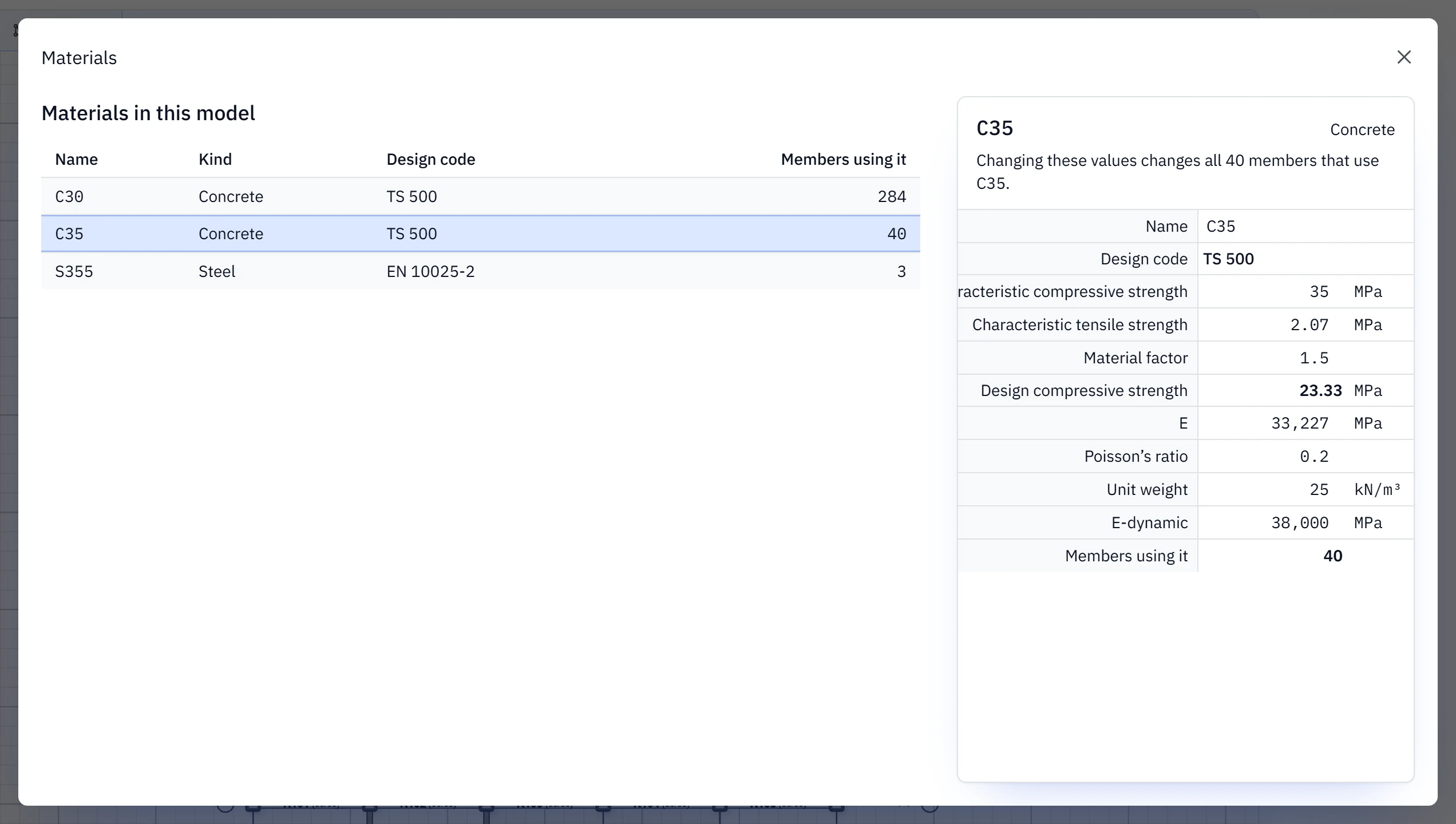
The list gives each material's Name, Kind, Design code and the number of Members using it: columns, beams, walls, slabs and stairs. Click a row to see its values.
| Kind | Values |
|---|---|
| Concrete | Characteristic compressive strength, characteristic tensile strength, material factor, E, Poisson's ratio, unit weight, E-dynamic |
| Steel | Yield strength, tensile strength, E, Poisson's ratio, unit weight |
A concrete also shows its Design compressive strength, the compressive strength divided by the material factor. It is worked out from the two and cannot be typed. Under BS 8110 and IS 456 the compressive strength is a cube strength; under the ACI codes the tensile strength is the modulus of rupture.
The values and the name can be changed in the window. A change reaches every member on the material, and the panel says how many that is before anything is typed. The window adds no material and deletes none: a material comes from a member's card or from the assistant, and one that no member uses any more leaves the model with the edit that left it unused.
A grade from the library
The Grade row of a member's card lists the model's materials of the member's kind. Choosing one moves that member alone. To move many members, select them first: the card of a selection has the same row.
For concrete and steel the last entry of the list is Add from library…. It opens the material library, where each design code is listed with the countries that use it.
| Design code | Countries |
|---|---|
| TS 500 · TBDY 2018 · Çelik Esasları 2018 | Türkiye |
| EN 1992 · EN 1993 | Europe, Malaysia |
| ACI 318-19 · AISC 360-16 | USA, Thailand |
| IS 456 · IS 800 | India |
| BS 8110 · BS 5950 | United Kingdom |
| NSCP 2015 | Philippines |
| SNI 2847:2019 | Indonesia |
Pick a grade in the table, or find it with Search grades, and press Use this grade. The grade becomes a new material of the model, named after it, and the member is put on it in one undo step.
The model keeps a copy of the library's values. A later change to the library does not reach a model that already holds the grade. Timber and masonry are not in the library; their values are typed in the Materials window. The eye beside the Grade row opens the member's material to read.
Material and shape
A member's card asks for the material first, then the shape. The material decides which shapes are offered, and each member takes only the materials it can be built of.
| Member | Materials |
|---|---|
| Column, beam | Concrete, Steel, Timber, Other |
| Shear wall | Concrete, Masonry, Timber, Other |
| Slab | Concrete, Steel, Timber, Other |
| Material | Shapes |
|---|---|
| Concrete, Other | Rectangle, circle, pipe, I, T, L, U, box |
| Timber | Rectangle, circle, I, box |
| Masonry | Rectangle (a wall) |
| Steel | A catalogue profile |
A member whose shape the new material does not take changes to the material's first shape and keeps its width and depth. Each shape asks for its own dimensions, in mm.
| Shape | Dimensions |
|---|---|
| Rectangle | Width (b), Depth (h) |
| Circle | Diameter (d) |
| Pipe | Outer diameter (D), Thickness (t) |
| I, T, U section | Depth (h), Width (b), Web thickness (tw), Flange thickness (tf) |
| L section | Depth (h), Width (b), Thickness (t) |
| Box | Width (b), Depth (h), Thickness (t) |
A change of shape keeps the dimensions the two shapes share. A set of dimensions that makes no section, such as flanges that add up to more than the depth, is not applied. The I, T, L and U sections also take a Direction: which way the flange, the corner or the opening faces.
Members with the same shape, dimensions and material share a section. How a section shared by many members is changed at once is on Modelling Columns and Beams.
Steel profiles
A steel column or beam takes a profile from a catalogue instead of typed dimensions. Its card gives the Profile, its depth and width, its area and its plastic section modulus, and Choose a profile… opens the catalogue.
| Part of the catalogue | What it holds |
|---|---|
| Standard | EN 10365, EN 10210, EN 10219, EN 10060, ASTM A6/A6M, GOST 26020 |
| Series | The standard's series, each with what it is (IPE, parallel flange I sections; HE, wide flange beams …) |
| Table | Profile, h, b, mass per metre G, A, Iy, Wpl,y; Search profiles finds one by name |
Moving to another standard or series picks the profile whose depth is nearest the one picked. Choose puts the profile on the member, which keeps its steel grade.
Walls, slabs and partitions
The thickness of a shear wall or a slab is held as a section one plate thick: walls and slabs of the same thickness and material share it. Their cards give the Material, the Grade and the Thickness.
A partition takes its Wall type (Brick, Aerated or Pumice) instead of a material, and weighs its thickness times the unit weight of that material. The unit weight is changed in the Materials window. The library holds no unit weight for pumice, so a pumice partition carries no load until one is typed there, and the model check reports it. Partitions are on Modelling Walls and Slabs.
With the assistant
A grade from the library and a new size can be asked of the assistant together. It shows the members it changes as a preview, and Apply puts the change in the model as one undo step. How commands are written and what the assistant can do is on Working with the Assistant.